Estimator guide
The Estimator builds a classed estimate from quantities and norms, prices it with your own rates and quotes, documents the basis, and hands it to the Planner as a resource-loaded baseline. This guide follows the tabs from left to right.
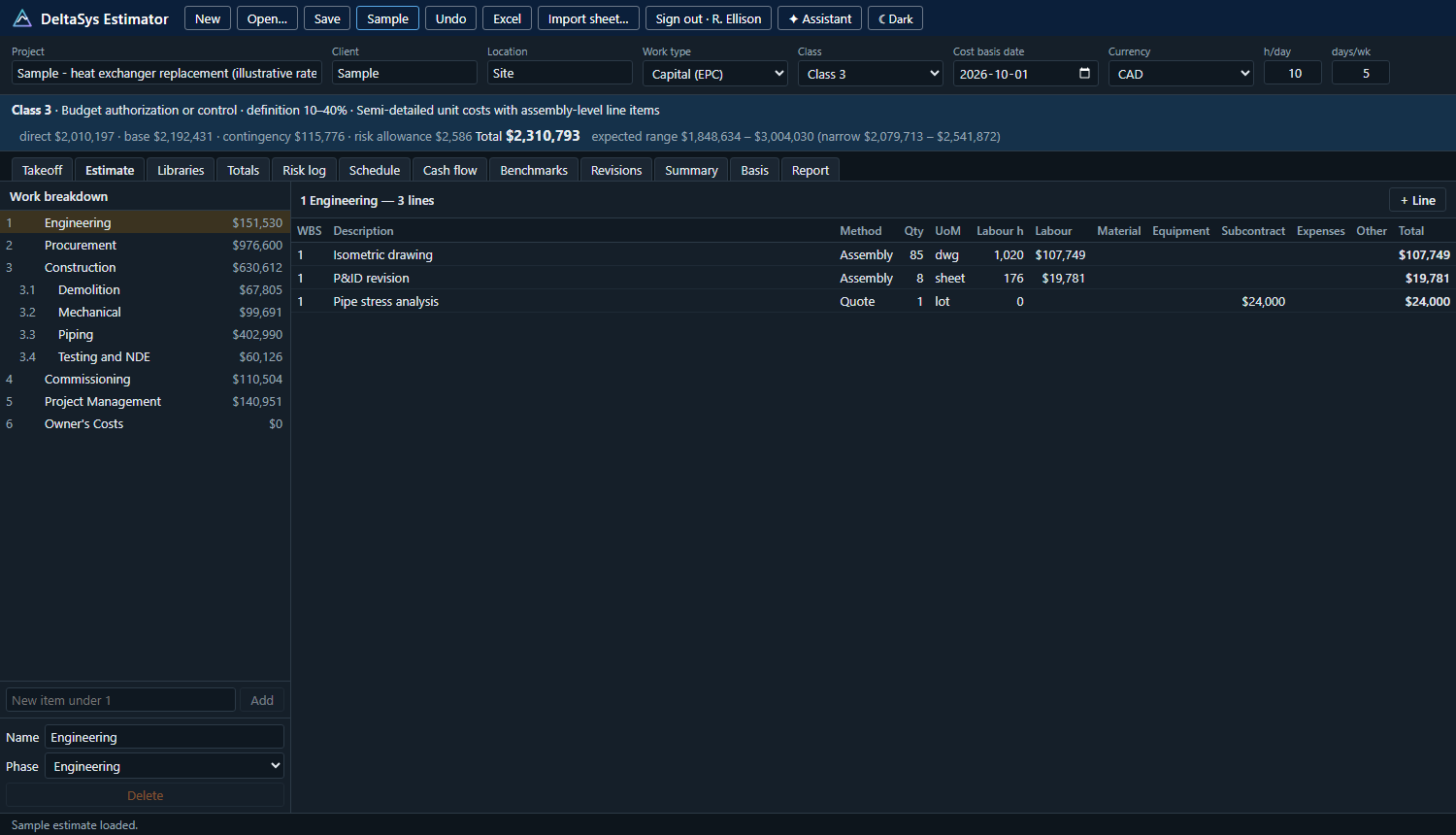
The header: class, basis date, currency
Every estimate carries a class, from Class 5 at concept screening to Class 1 at detailed design, in the manner of the AACE International classification practice. The class bar states the definition range, the end use and the methodology expected, and the accuracy range around the total, narrow and wide. The cost basis date is the date the prices are good for; escalation runs from it. Hours a day and days a week set crew durations and equipment day rates.
Class evidence. The class is set by the maturity of the project definition, not by the method used. The class bar's evidence button opens a checklist of nineteen definition deliverables (scope, capacity, site, schedule, WBS, code of accounts, contracting strategy, diagrams, layouts, equipment lists, specifications, discipline drawings, quantity takeoff), each marked none, started, preliminary or complete. The checklist generalizes AACE's input maturity matrix: it shows the class the evidence supports next to the class the estimate claims, the deliverables below the claimed class's expectation, and lets you set the estimate to the supported class. The checklist goes into the Basis of Estimate and the report, so a reviewer sees why the estimate is the class it is.
Takeoff
Enter quantities by commodity from drawings or a model: feet of pipe, welds, supports, cable, concrete. Takeoff quantities feed the estimate lines that reference them, so a revised takeoff reprices the lines.
Estimate
The WBS on the left shows each node's total. A node's lines are on the right. A line is a quantity of work with, per unit, the labour hours by craft or crew, material, equipment hours, subcontract, expenses and other costs; or a lump sum from a quote or an allowance. Three methods:
- Assembly: quantity times a norm from the library (hours per unit by crew, material per unit, equipment per unit), with a productivity factor for site conditions.
- Quote: a vendor or subcontractor price, with its reference and date.
- Allowance: a judged amount for scope not yet defined, flagged as such in the basis.
The BOM import turns a bill of material into lines; Import sheet reads an existing estimate from a spreadsheet with column mapping.
Libraries
The libraries hold what the lines price from: crafts (a trade at a level with its base wage), rate sets (the build-up from wage to all-in rate: statutory payroll costs, benefits, small tools, overhead, profit), crews (a mix of crafts priced at the blended rate), equipment (day, week or month rates), materials (unit cost, waste, supplier, quote reference, price date, lead time, weight, currency) and assemblies (the norms). A catalogue generator builds assemblies from a reference CSV. Everything in the sample is illustrative; replace it with your own.
Totals
The build-up from direct cost by type (labour, material, equipment, subcontract, expenses, other) through markups, escalation by phase or on the cash flow, base cost, contingency and risk allowance to the total, with the currency exposure of foreign-priced items. Contingency is a percentage or comes from the risk analysis at your confidence level.
Risk log
Threats and opportunities with probability and three-point cost and schedule impacts before and after the response, the response and its cost, actions and owners. The log scores on your matrix, computes the expected value, and with the Risk analysis contingency method runs a Monte Carlo over the lines' uncertainty and the risk events to give the contingency at P50, P80 or the level you choose. The log travels to the Planner with the estimate.
Contingency held. The log shares the contingency over the open threats in proportion to their expected value after response and shows what is held against each, with the rest left for the lines' own uncertainty. That allocation goes to the Planner with the estimate, where the contingency ledger starts from it: a risk retired releases its share, a risk that occurs draws on it.
Schedule
A baseline schedule from the estimate: the WBS becomes the work breakdown, lines become activities with durations from crew hours and crew sizes, in the phase order with your logic. Open in the Planner hands it over with the resources and rate sets, the quantities, the risk log and the estimate's class and reference, so the schedule starts as a resource-loaded baseline aligned to the estimate.
Cash flow
The estimate spread over the schedule by period, by cost type and by WBS, with escalation applied month by month when that method is chosen. Exports to CSV and to the Excel workbook.
Benchmarks
A database of past projects' actuals, kept apart from any estimate: unit rates and ratios by work type and location, normalised by a location factor. Compare the estimate's rates and ratios against them to spot lines that are out of line, and record this estimate's outcome later to grow the database.
Accuracy. Close-out takes the final project cost with the actuals, and keeps the estimate's class, total and every frozen revision with it. The Accuracy tab then measures how the estimates performed: each project's final cost against its final estimate and against each earlier revision, judged against the class's expected range, and a summary by class (points, mean and median deviation, share within the narrow and wide bands). That is the estimating performance measure owner guidelines ask for: conceptual against baseline against pre-tender against final.
Revisions
Each revision is kept with its total and a note. Compare any two: which lines changed, by how much, and why.
Reviews. Each revision carries its reviews: estimating guidelines, engineering and design, project team, management, and an independent third party, with the reviewer, the scope examined, the findings (area, major or minor, the estimator's response, open or closed) and the reviewer's sign-off. A revision is ready to approve when every review has concluded and no major finding is open; the Revisions tab says so, and the report and the Basis of Estimate carry the review record.
Summary, Basis and Report
Summary is the one-page view by WBS and cost type with the class, the accuracy range and the contingency. Basis is the basis of estimate: scope, inclusions, exclusions, assumptions, deliverables, contracting, execution and risks as you write them, plus the generated parts (methodology, libraries used, quotes and their dates, allowances). Report prints the estimate pack through the browser.
Files and Excel
The estimate is kept in the browser between visits and saved as a .estimate.json file with Save (Ctrl + S). Excel writes a workbook: summary, estimate detail, by WBS, labour rates, materials, cash flow and the risk register. The benchmark database exports and imports separately.
The assistant
The ✦ Assistant button opens a panel that answers questions about the open estimate: what drives the total, what is missing for the class, whether the contingency matches the risks logged, and it drafts basis of estimate text. See The assistant.